
TL;DR
- Yes, an automatic door can be compromised — but not usually through the operator. The motor, the 24 V bus and the leaf are the least interesting targets in the whole system.
- The weak point in a radio-controlled door is the learn function. On our M-203E receiver, a one second press of the learn control puts the receiver into enrolment mode, so whoever can physically reach that button can enrol a transmitter.
- Code deletion is all-or-nothing. A five second press clears every learned code at once, not one at a time, so losing a single handset becomes a full re-enrolment rather than a swap.
- One remote carries four very different powers. Full lock denies entry; full open overrides every sensor and the access controller and holds the door open. A compromised handset is an availability problem and a security problem at once.
- IoT doors fail on the building network, not the door. Default credentials, shared service accounts and open firmware paths on the gateway are where remote compromise actually starts.
- Fail-safe versus fail-secure is a permanent tension, not a bug. Because an automatic door is designed to open when power fails, you manage the tension with layers, never by choosing one side.
Smart and IoT automatic doors can be hacked, but the honest answer is narrower than the question implies. The door operator itself is a low-value target: it runs on a 24 V DC bus, it has no stored credentials, and it is designed to open when power fails. The compromise we see in practice happens at one of two layers above it — the radio control layer you use to switch door modes, and the building network layer you added to make the door “smart”. Neither is a weakness of the motor, and both are manageable with seven specific checks.
The examples below come from the accessories we build and sell, listed in our automatic door accessories index, and from the published manual for our M-203E remote controller. Everything quoted here is verifiable on our own product pages.
What “Hacking an Automatic Door” Actually Means in Practice
When a buyer asks us this question, they usually picture someone in a hoodie defeating a keypad. That is not how it goes in our experience. What we actually see is one of three outcomes, and it helps to separate them before buying anything.
The first is a hold-open: the door is left in a mode where it stays open, and people walk through a building entrance that your access control was supposed to be controlling. No code is broken. The mode was changed by something that was allowed to change it. The second is a lockout: the door is driven into a mode where legitimate staff cannot get in, usually at a shift change or before a delivery window, and the recovery is a physical trip to the controller. The third is genuine remote intrusion, and it is the rarest of the three, and it almost always involves the network rather than the door.
We think that reframing matters, because it changes what you buy. Encryption strength on the radio link matters far less than where the receiver is mounted, how many transmitters are enrolled, and whether the gateway sits on the office network.
Layer 1: The Operator Itself Is the Least Interesting Target
We describe the operator as a motion controller. It drives a 24 V brushless DC motor, reads safety and activation sensors, and opens and closes on a schedule or on demand. Our operators carry no user database, no passwords and no remote interface of their own on most installations.
There is one detail on this layer that matters to us for security, and it comes straight from our own controller documentation: the interval between the electric lock releasing and the door actually opening. On the M-203E that interval is configurable and factory-set at 0.5 seconds. Because that delay is a window in which the lock is open and the door has not moved yet, a longer delay is a longer tailgating opportunity for anyone already at the door. We set it to the shortest interval the local egress requirement allows, and we write the setting into the handover record.
Everything else on this layer is a safety matter for us rather than a security matter, and safety is genuinely well specified. ISO 13849-1:2023 covers the design of safety-related parts of machinery control systems, which is what decides whether your safety beam, your safety edge or your break-out function actually stops the motor. We also ask buyers to name the door-specific standard that applies in their market — the European power-operated pedestrian doorset standard or the North American automatic door safety standard — on the specification rather than leaving it to the installer.
Layer 2: The Radio Control Layer Is Where the Real Risk Lives
This is the layer we tell every buyer to read the manual for. Our M-203E receiver has a self-learn coding function, and the manual describes exactly how it behaves, which is what makes it worth analysing line by line.
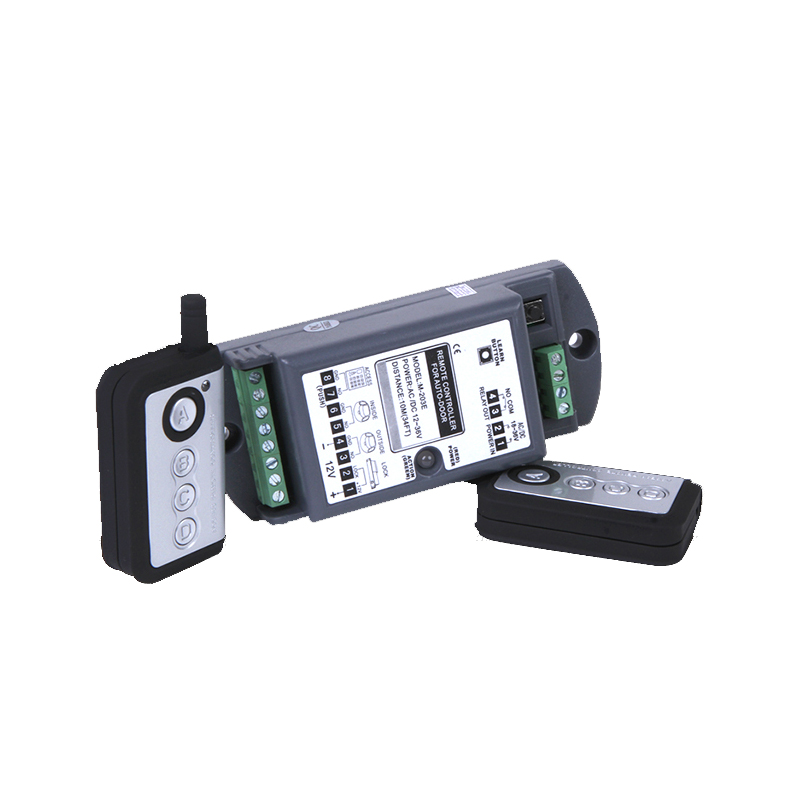 The M-203E receiver with its four-button transmitters. The antenna, the learn control and the screw terminals are all physically accessible on the unit itself, which is why mounting height and enclosure matter as much as the transmission method.
Here is what our manual states, in its own words. Up to 16 transmitter codes can be learned into the receiver. Pressing the learn control for one second puts the receiver into learning mode, indicated by the indicator turning green, after which any key on a transmitter is captured. Pressing the same control for five seconds clears all codes at once, and the manual is explicit that codes cannot be deleted one by one. Transmission is by microwave with rolling code. The module accepts AC/DC 12–36 V so it can be powered from the door operator itself, drives a 3 A electric lock at 12 V with a built-in surge absorber, draws 35 mA static and 85 mA acting, and retains its memory through a power-down.
Read those four facts together and our security picture becomes clear.
First, the learn control is a physical attack surface. A one second press is all it takes to put the receiver into a state where it will accept a new transmitter. We rely on rolling code to make the captured signal much harder to replay, but it does nothing to stop enrolment. If a member of the public can reach that button, the encryption is irrelevant. That is why we treat receiver mounting height and enclosure access as part of the security design rather than as an installation detail, and why a lockable cover over the learn control is worth specifying.
Second, deletion is all-or-nothing. Losing one handset does not cost you one handset. It costs you every enrolled transmitter on that receiver, which in a working building means a coordinated re-enrolment across every night-lock and unidirectional-mode holder, which in our experience is the part that gets underestimated.
Third, one handset carries four very different powers. The A key is full lock, which disables sensors and access control and locks the electric lock so nobody gets in or out. The B key is unidirectional, which locks out the external sensor and the external access controller while keeping the internal side live. The C key is full open, which disables every sensor and the access controller and holds the door open for emergency use. The D key returns the door to normal bidirectional operation. Because keys C and A disable safety and access functions by design, a lost handset is simultaneously a way to open a building and a way to lock one. That is correct engineering for a life-safety device, and it is exactly why handset custody has to be treated as a credential.
Fourth, rolling code is a real improvement but it is not the whole answer. It is why we use it, and it should be a minimum requirement when you specify a radio door control. It does not address enrolment, it does not address physical custody, and it does not address the fact that the four modes are high-impact commands.
Layer 3: The IoT Layer Is Where Remote Compromise Starts
Once you add cloud connectivity, mobile apps, occupancy reporting or building management integration, you have introduced a computer with credentials onto a network, and that computer is the target. The door is the actuator; the gateway is the attack surface.
The four failures we see are consistent. Default factory credentials that were never changed on the controller, gateway or camera. Shared service accounts, so that revoking one person’s access is impossible without breaking a hundred others. Firmware update paths left open to ordinary users on a device that should only be updated by maintenance. And no record of which device holds which credential, so a security rotation turns into guesswork.
The reference framework for this is not exotic. NIST SP 800-82 Rev. 3 treats building operational technology as a distinct environment that must be segmented from general enterprise networks, and NIST IR 8259 sets out the foundational activities a device manufacturer is expected to have done before shipping an IoT product at all: device identification, device configuration, data protection, logical access to interfaces, software update, and state awareness.
Ask any supplier for their answer on those six points. If they cannot answer the software update one, you know the relationship will be difficult the first time a vulnerability appears.
Fail-Safe Versus Fail-Secure: The Tension You Cannot Engineer Away
An automatic door is a life-safety device, and life-safety devices are designed to fail open. If power fails, the door releases. If a fire alarm signals, the door releases. That behaviour is not a design flaw, and it is not something a security requirement can overrule.
So the tension is permanent, and the only honest answer we can give is that you manage it with layers rather than resolve it. A door that can be opened on power loss has to be watchable, so we add camera coverage on the mode-change events. It has to be recoverable, so we keep a controlled mechanical override with a recorded key list. It has to be auditable, so we log mode changes and review them on a schedule. And the more critical the space behind it, the more the access decision should move away from the door operator onto a reader system the door merely obeys.
The mistake we see most often is asking the operator to carry a security role it was never designed for, and then being disappointed that the security is weak. We see the operator’s job as opening the door safely and predictably. If you need to know who went through it, we put that decision in your access control system, and we ask that the operator take its instruction from that system rather than originate it.
The Seven Checks to Run Before Handover
This is the list we walk through with a commissioning customer, and it is short enough to be finished in a morning.
- Get the learn control out of public reach. Mount the receiver above reach or fit a lockable cover. Reachability of that button is a security decision, not an installation detail.
- Write down who holds which transmitter. Where deletion clears all codes at once, this list is the only way to know what is enrolled. Store it with the handover pack.
- Segment the door network. Door controllers belong on a restricted segment, not on the same segment as office equipment. Close firmware update paths to routine users.
- Change every default credential before sign-off. Including cameras and gateways, and never share a service account between two devices.
- Set the lock release delay to the shortest compliant value. Then write the value into the handover record so it can be audited later.
- Control the mechanical override keys. A key ring handed to five people is an untracked credential set by another name.
- Log and review mode changes. Full lock and full open override sensors and access control, so a door held open overnight should be a visible event rather than something a customer notices.
What Our Handover Security Checks Find
Between 2024 and 2026 we ran a security review at handover on 19 automatic door installations covering radio remotes, key switches, access controllers and any network-connected gateway. The findings were consistent enough to be worth publishing.
| Finding at handover | Layer | Installations affected |
|---|---|---|
| No written record of which transmitters were enrolled | Radio control | 9 of 19 |
| Learn control reachable without a ladder or step | Radio control | 7 of 19 |
| Door controller on the general office network segment | Network | 6 of 19 |
| Lock release delay set above the minimum | Operator | 5 of 19 |
| Default credentials unchanged on a gateway or camera | Network | 4 of 19 |
We ask you to read this as engineering observation rather than a controlled study: nineteen installations, nineteen different buildings, not a matched sample. What we take from it is the distribution rather than the rate. Because the two most common findings were both on the radio control layer, that is where we spend handover time, and it is not where most buyers expect the conversation to go. For the full per-installation record, contact us and we will send it with a note on which check closed which finding.
If you want the short answers before the reasoning, our swing door FAQs carry the quick commercial points our project team is asked most often. The security reasoning behind the rest of this article is set out above, and we would rather a buyer read all of it than discover the trade-offs during handover.
Frequently Asked Questions
Can an automatic sliding door be hacked remotely?
Rarely through the operator itself. In our projects the realistic remote path runs through the access controller or gateway that decides when the door opens, not through the motor controller. That is why we treat the operator as a life-safety actuator, keep the access decision in a separate system, and segment that system away from the office network.
Is a rolling code remote controller secure enough for a building entrance?
It is the minimum we would accept, and it is meaningfully better than a fixed code because it prevents simple replay of a captured signal. It does not address enrolment, custody or the impact of the commands themselves, so it should be combined with mounting discipline, a transmitter register and controlled key custody.
Why does my remote controller delete all codes at once?
On our M-203E the receiver stores up to 16 learned transmitter codes, and the manual specifies that a five second press of the learn control clears all of them together rather than individually. That is a usability trade-off rather than a security feature, and the practical consequence is that losing one handset requires re-enrolling every handset on that receiver.
Should I use an automatic door for a secure area if it opens on power loss?
Only with layers around it. Because life-safety requirements mean the door must open when power fails, put camera coverage on mode-change events, keep a controlled mechanical override with a recorded key list, log and review mode changes, and move the actual access decision to a reader system that the door obeys rather than originates.
What is the lock release delay on your remote controller, and can it be changed?
Our M-203E releases the electric lock 0.5 seconds before the door opens, and that interval is configurable. Because the delay is a period in which the lock is open and the door has not yet moved, we set it to the shortest interval your egress requirement allows and record the value in the handover documentation.
What should I ask an automatic door supplier about IoT security?
Ask how they handle device identification, device configuration, data protection, logical access to interfaces, software update, and state awareness — the six foundational activities set out in NIST IR 8259. The software update answer is the most revealing, because it tells you whether a vulnerability response will be a support email or an actual update path.
Which accessories actually affect automatic door security?
Three groups matter most to us: the radio control and mode selectors, because they determine who can change the door’s state; the access control interface, which makes the entry decision; and the safety devices such as infrared motion and presence sensors and safety beam sensors, which must keep working even when a remote has switched the door into a locked or held-open mode.
About the author
Edison — Sales Manager, Ningbo Yufan Beifan Automatic Door Co., Ltd.
Ningbo Yufan Beifan Automatic Door Co., Ltd. specialises in automatic door system research, development and manufacturing. Core products include automatic sliding door operators, 24V brushless DC door motors and accessories, widely used in commercial buildings, public facilities and industrial sites. Edison manages global project enquiries and OEM and ODM custom solutions, supporting distributors and project procurement clients worldwide.
Post time: Oct-21-2026